AI Recommendations is a powerful feature that analyzes your customer conversations and automatically generates actionable suggestions to improve your store's customer experience.
By leveraging AI to understand customer interactions, this feature transforms real shopper interactions into prioritized recommendations that help you address unmet needs and reduce friction points.
- Navigate to AI Recommendations
- Understand the AI Recommendations Dashboard
- Understand Individual Recommendation Cards
Navigate to AI Recommendations
- Log into the Rep console at the following link: https://app.hellorep.ai/home
- In the left-hand menu, navigate to Insights > AI Recommendations.
Understand the AI Recommendations Dashboard
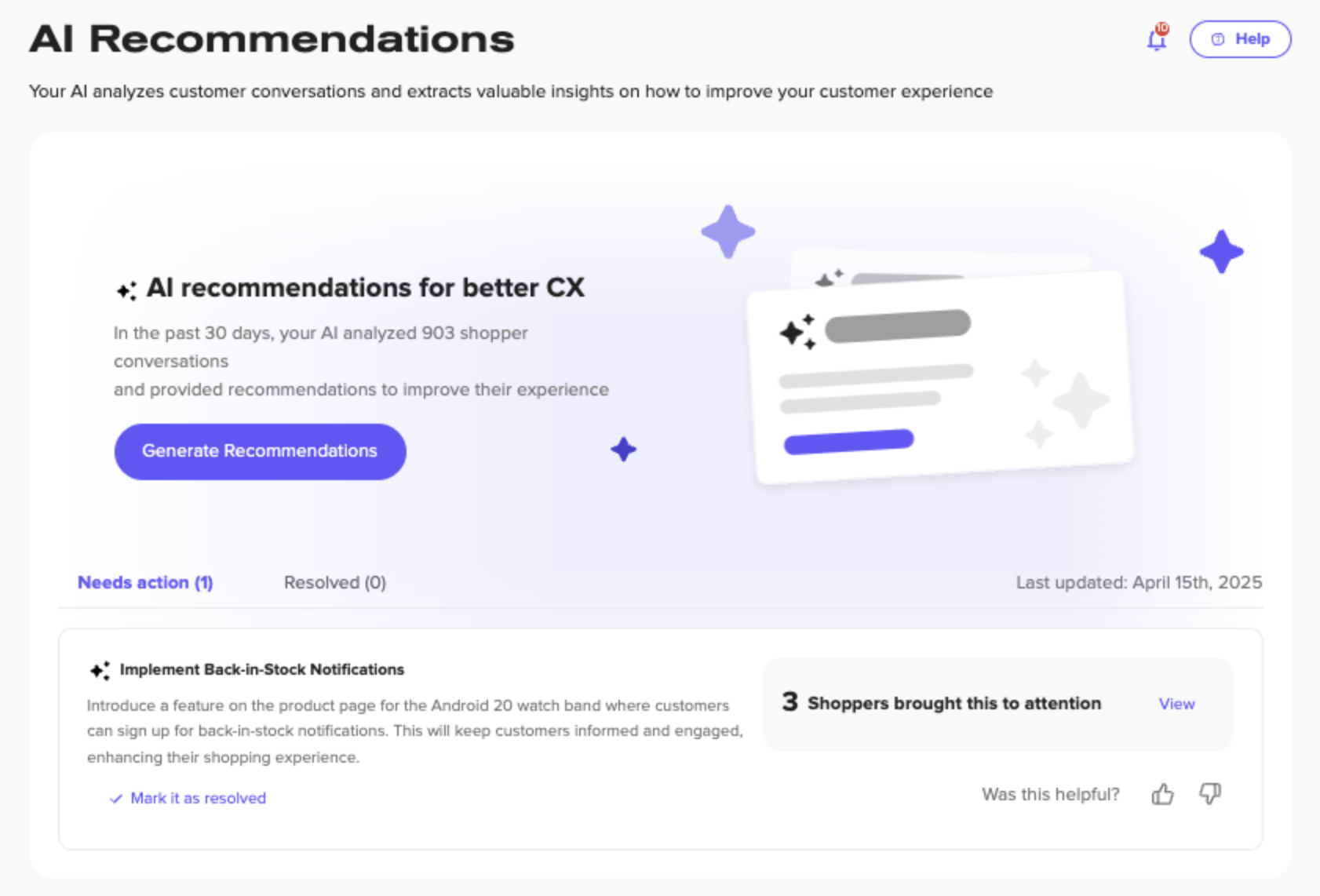
Header Summary Card
At the top of the page, you'll see a summary that includes:
- Number of analyzed conversations from the past 30 days.
- Generate Recommendations button - Click this to check for new insights. Check this routinely, as new recommendations may be generated based on new shopper conversations.
- Last updated timestamp showing when recommendations were last generated.
Recommendation Tabs
The dashboard is organized into two main tabs:
- Needs Action (Default view): Shows all current AI recommendations awaiting your review and action
- Resolved: Historical log of suggestions you've already marked as completed
Understand Individual Recommendation Cards
Each recommendation card provides detailed information to help you make informed decisions:
Card Components
- Recommendation Title: A clear, descriptive name for the suggested improvement.
- Detailed Description: Specific, actionable improvement ideas generated by AI.
- Reasoning: Explains the customer frustration or missed opportunity detected from conversations
- Impact Metrics: Shows how many shoppers raised or mentioned this need.
Available Actions
For each recommendation, you can:
- View: Click to examine the source conversations that led to this recommendation
- Mark as Resolved: Once you've implemented the suggestion, mark it as complete to move it to the Resolved tab
- Provide Feedback: Use the thumbs up/down buttons to indicate whether the recommendation was helpful
Need help or advice? Reach out to us at: support@hellorep.ai